Audio to Text Converter Comparison: 6 Tools Put to the Test
You isolated the vocals and cleaned the audio — now turn that track into text. We compared six audio-to-text converters on the files creators actually work with: isolated dialogue, cleaned podcasts, and interview recordings.
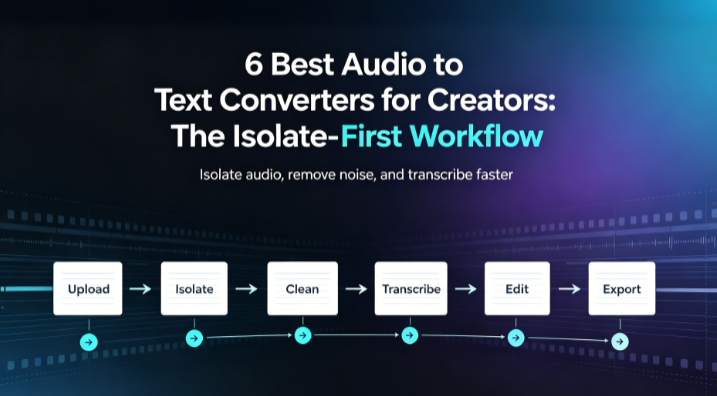
Here is the workflow most creators miss: separate, then transcribe. When you run Voice Isolator on a noisy video, you get a clean vocal track with the background stripped away. That clean track is also the best possible input for an audio-to-text converter — fewer errors, better speaker separation, sharper subtitles.
So once your audio is clean, which tool should turn it into words? We tested six on isolated and cleaned files to find out.
Table Of Contents
- Why Creators Need an Audio to Text Converter After Isolation
- How We Compared
- Quick Comparison
- Head-to-Head: 6 Converters
- Which One Should You Use?
- Frequently Asked Questions
- Final Recommendation
Why Creators Need an Audio to Text Converter After Isolation
Think of it as a two-step pipeline:
- Voice Isolator removes background noise and pulls the vocal or dialogue stem free.
- An audio to text converter transcribes that clean stem into subtitles, show notes, or a searchable script.
Skipping step one and feeding raw, noisy audio straight into a transcriber is the #1 reason people complain about "bad accuracy." Clean input, clean output.
How We Compared
We used three real creator files:
- An isolated vocal stem from a noisy vlog (cleaned with Voice Isolator).
- A two-person podcast episode with light room reverb.
- A Spanish-English interview with street noise removed.
Each tool processed all three. We scored WER on the isolated dialogue, subtitle export (SRT/VTT), languages, and what it costs.
Quick Comparison
| Tool | Best For | Subtitle Export | Languages | Free Tier |
|---|---|---|---|---|
| AudioTranscription.io | Subtitles from clean audio | SRT + VTT | 100+ | Yes (no card) |
| Otter.ai | Live talks | Basic | English-focused | Yes (limited) |
| Descript | Text-based editing | SRT | 1 primary | Trial only |
| Rev.com | Publish-perfect text | SRT/VTT | Limited | No |
| Whisper (OpenAI) | Free & private | Manual | 90+ | Yes (self-host) |
| Sonix | Translation + transcription | SRT/VTT | 40+ | Trial only |
Head-to-Head: 6 Converters
1. AudioTranscription.io— Best for Subtitles From Clean Audio
This was the standout for our exact use case: take a Voice Isolator clean vocal stem and get subtitles back.
Why it fit the pipeline:
- It accepted our isolated MP3 vocal stems without complaint.
- Exported straight to SRT and VTT — drop into your editor, done.
- 100+ languages meant a Spanish interview and an English podcast both worked.
- A no-card free tier let us test a real isolated file before paying.
- Built-in AI summaries turned a 40-minute cleaned episode into show notes in one click.
If your flow is isolate → transcribe → caption, this Audio to Text Converter is the smoothest link in the chain. Try it on your isolated audio and compare the subtitle file against your current tool.
- Strengths: Subtitle export, language coverage, free start, summary built in.
- Weaknesses: Not a live-capture tool for streams.
- Use it if: You already clean audio and need text/subtitles fast.
2. Otter.ai — Best for Live Talks
If you stream or present live, Otter captures in real time and gives searchable notes. Great for the "talk now, read later" crowd.
- Strengths: Real-time capture, good English.
- Weaknesses: Weaker subtitle export; free tier is tight.
- Use it if: You need live text, not post-production captions.
3. Descript — Best for Editing the Words
Descript lets you edit audio by editing text. For creators who polish shows, that is powerful — fix a sentence and the audio follows.
- Strengths: Text-based editing, overdub, studio sound.
- Weaknesses: Trial only; subtitle workflow is editor-centric.
- Use it if: You want to edit and transcribe in one place.
4. Rev.com — Best for Publish-Perfect Text
When the transcript is going public and must be right, Rev's human option is the safety net. You pay per minute.
- Strengths: Near-perfect human accuracy.
- Weaknesses: Not free; slower than AI.
- Use it if: The text is customer-facing and errors are costly.
5. Whisper (OpenAI) — Best Free and Private
Open-source and free, Whisper powers many paid apps. Run it yourself for zero cost and full privacy.
- Strengths: Free, 90+ languages, private.
- Weaknesses: You build the export and caption pipeline.
- Use it if: You are technical and want control.
6. Sonix — Best for Translation Plus Transcription
Sonix adds translation on top of transcription, useful when your isolated interview needs to reach another language.
- Strengths: Translation, clean UI, good accuracy.
- Weaknesses: Trial only.
- Use it if: You localize content across languages.
Which One Should You Use?
Follow the pipeline, then pick by need:
- Isolated vocals → subtitles: An Audio to Text Converter with SRT/VTT export and a free start.
- Live stream: Otter.ai.
- Editing the show: Descript.
- Perfect public text: Rev.com.
- Free and private: Whisper.
And remember the first step that makes all of this better: clean the audio first. Run your file through Voice Isolator to strip noise and isolate the voice, then hand the clean stem to your transcriber. The accuracy jump is immediate.
Frequently Asked Questions
Should I transcribe before or after isolating vocals?
After. Isolating vocals (or cleaning noise) gives the transcriber a cleaner signal, which directly improves accuracy and speaker separation.
Can an audio to text converter make subtitles from my isolated track?
Yes — most export SRT and VTT. Use an Audio to Text Converter that supports both, then load the file into your video editor.
Do I need to pay for good results?
Not always. Several tools offer a usable free tier. Test a real isolated file before paying; accuracy on your audio matters more than a vendor's demo.
Will it understand accented or multilingual speech?
The stronger multilingual tools (100+ languages) handled accented English and language switches far better than English-only services in our test.
What format should I export for YouTube or Premiere?
SRT or VTT. Both are standard and import cleanly into YouTube, Premiere, and most editors.
Final Recommendation
The winning combo for creators is simple: Voice Isolator to clean, then an audio-to-text converter to caption. For the second step, the tool that fit our isolated-audio workflow best was one built for subtitles and multilingual input with a no-card free start.
Start by isolating your vocals free, then turn that clean audio into text and subtitles to see the difference a clean signal makes.