For years, "free AI photo editor" meant one of two things: a watermark slapped across your export, or a tool that lets you edit one photo before demanding a credit card.
In 2026, that's finally changing. A new wave of browser-based AI tools is offering real, no-strings-attached editing — from one-click enhancement to image-to-image style transfer — without locking features behind a paywall.
In this guide, we break down the best free AI photo editors available today, focusing on tools that actually deliver production-quality results without hidden fees.
Quick Picks: The best free AI photo editors in 2026 are Free AI Photo Editor Online for all-in-one enhancement and style transfer, Canva for quick social media edits, and Pixlr for browser-based generative fill. For users who want zero cost, no watermark, and no sign-up, Free AI Photo Editor Online stands out as the most complete free option.
Table Of Contents
- Quick Comparison: Which Free AI Photo Editor Fits Your Needs?
- The Best Free AI Photo Editors (Detailed Review)
- How We Tested and Evaluated These Free AI Photo Editors
- FAQs
Quick Comparison: Which Free AI Photo Editor Fits Your Needs?
| Tool | Best For | Standout AI Features | Pricing |
|---|---|---|---|
| Free AI Photo Editor Online | All-in-one enhancement & style transfer | AI auto-enhance, 4× upscaling, denoise/deblur, image-to-image style transfer, background removal | Free — no sign-up, no watermark, no daily limits |
| Canva | Social media content creation | AI photo enhancer, one-click background removal, Magic Edit, social media templates | Free tier; Pro from $12.99/month |
| Pixlr | Quick creative edits in the browser | AI Generative Fill, background removal, layer support | Free tier; Pro from $7.99/month |
Below, we break down each tool in detail, including strengths, limitations, and who it works best for.
The Best Free AI Photo Editors (Detailed Review)
Free AI Photo Editor Online — Best Free All-in-One AI Photo Editor
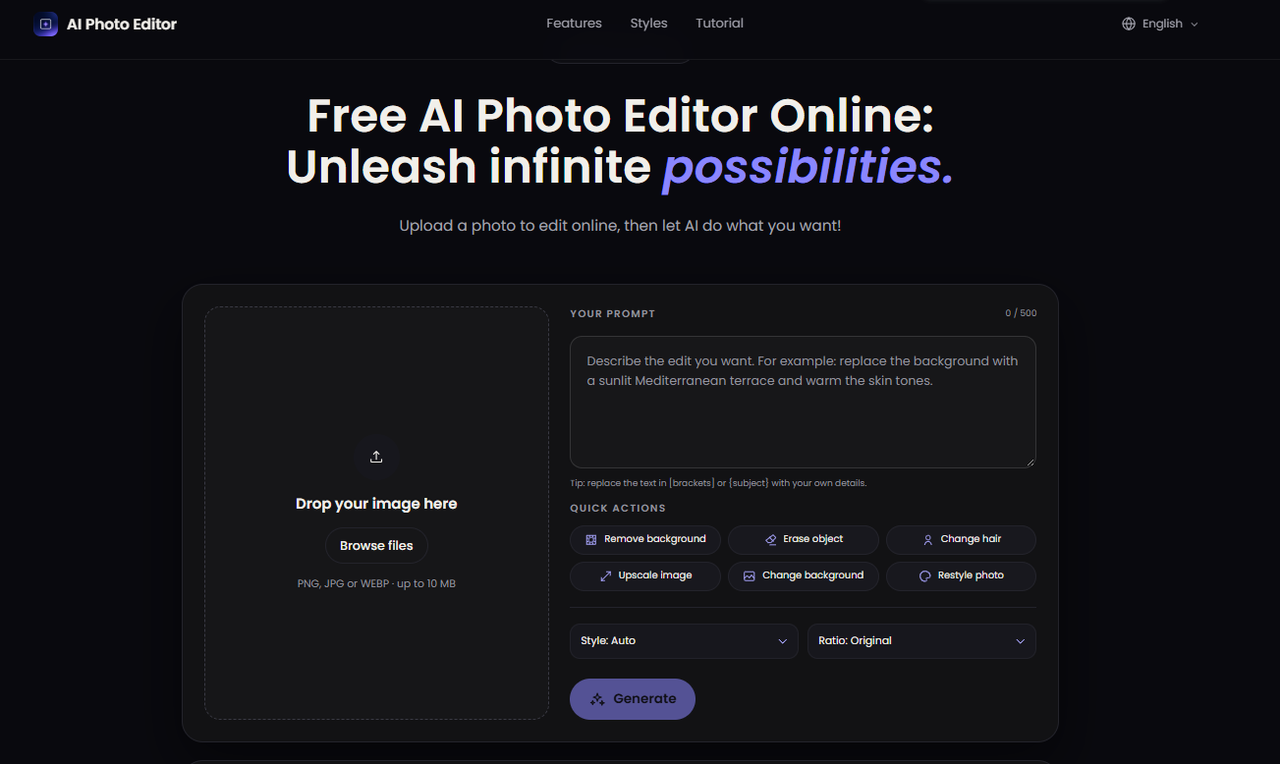
Free AI Photo Editor Online is a browser-based AI photo editing workspace that combines three core tools in a single interface: AI Photo Editor, Image To Image, and AI Photo Enhancer.
Unlike most free tools that offer only a stripped-down version of their paid product, this one provides full functionality at zero cost. There's no sign-up, no daily limit, and no watermark on exports.
The enhancement pipeline handles common quality problems — noise, motion blur, underexposure, and low resolution — in a single pass. For e-commerce sellers and content creators who need to clean up product photos or batch-process social media images, this eliminates the need for multiple tools.
The Image To Image feature goes beyond simple filters: upload a photo and reimagine it in anime, cyberpunk, watercolor, or pixel art style, or place a product shot into a beach, studio, or kitchen scene.
Key AI Features
- AI auto-enhancement: exposure, contrast, white balance, saturation in one click
- 4× upscaling with detail reconstruction
- Denoise, deblur, and old photo restoration
- Image-to-image style transfer (anime, cyberpunk, watercolor, pixel art)
- AI background removal and object erasing
- Before/after comparison slider
Pros
- Completely free — no sign-up, no watermark, no daily limits
- Three tools in one workspace (editor, enhancer, image-to-image)
- 4K output included
- Works entirely in the browser, no install needed
Cons
- Not a full layer-based editor like Photoshop
- No advanced color grading tools
Pricing
Free. All features, all resolutions, no account required.
Canva — Best Free AI Photo Editor for Social Media Content
Canva's free tier includes a surprising amount of AI photo editing capability. The AI photo enhancer automatically adjusts lighting and color, the background remover works on most images, and Magic Edit lets you modify specific areas with a text prompt.
It's particularly strong for social media creators who need to turn photos into polished posts quickly — built-in templates, aspect ratio presets, and text tools mean you can edit and publish in one flow.
Key AI Features
- AI photo enhancer
- One-click background removal
- Magic Edit (text-based object modification)
- Social media templates and layouts
Pros
- Easy to use, great for beginners
- Huge template library
- Integrated design tools
Cons
- Free tier has limited AI credits
- Watermark-free exports require Pro
- Not suitable for high-end retouching
Pricing
Free tier available. Canva Pro starts at $12.99/month.
Pixlr — Best Free Browser-Based AI Editor for Quick Creative Edits
Pixlr runs entirely in the browser and offers a lightweight Photoshop-like experience. The AI Generative Fill feature lets you modify images through text prompts, and the background removal tool handles most product photos and portraits.
It's a good middle ground between Canva's simplicity and Photoshop's power — enough control for basic compositing, without the learning curve.
Key AI Features
- AI Generative Fill
- AI background removal
- Browser-based editing
- Layer support
Pros
- No installation required
- Layer-based editing
- Free tier available
Cons
- Limited RAW support
- Not suitable for professional workflows
- Free tier has ads and export limits
Pricing
Free tier available. Pixlr Pro starts at $7.99/month.
How We Tested and Evaluated These Free AI Photo Editors
To identify the best free AI photo editors in 2026, we evaluated each tool based on four criteria:
Actual Free Value
We tested whether the "free" version was genuinely usable — no watermark, no hidden paywall mid-export, and no artificial limits that make the free tier useless.
Output Quality
We ran the same set of test photos (grainy portrait, dark product shot, old scanned photo, low-res screenshot) through each tool and compared results for naturalness, detail recovery, and artifacts.
Workflow Speed
We measured how quickly a user can go from upload to export. Tools that require account creation, onboarding, or credit card entry scored lower.
Feature Breadth
We evaluated whether each tool handles multiple editing tasks (enhancement, style transfer, object removal) or only a single function.
FAQs
What is the best free AI photo editor without a watermark?
Free AI Photo Editor Online is the most complete free option with no watermark, no sign-up, and no daily limits. Canva and Pixlr also offer free tiers but limit some features or require upgrades for watermark-free exports.
Can I use a free AI photo editor for commercial work?
Yes, if the tool allows commercial use. Free AI Photo Editor Online permits commercial use of exported images at no cost. Always check the terms of service for any tool before using it for client work.
Do free AI photo editors work as well as paid ones?
For basic enhancement, style transfer, and background removal, the gap has narrowed significantly. Free tools like Free AI Photo Editor Online now match paid competitors on quality for most common use cases. The main difference is in advanced features like layer-based compositing and RAW processing.